ArmoFoldz 3D
Dessinez vos idées en 3D, simplement et avec précision : pièces, objets, meubles, petits ouvrages. Gratuit et sans publicité. Il ne sert pas aux très grosses modélisations ni à l'architecture complexe.
Découvrir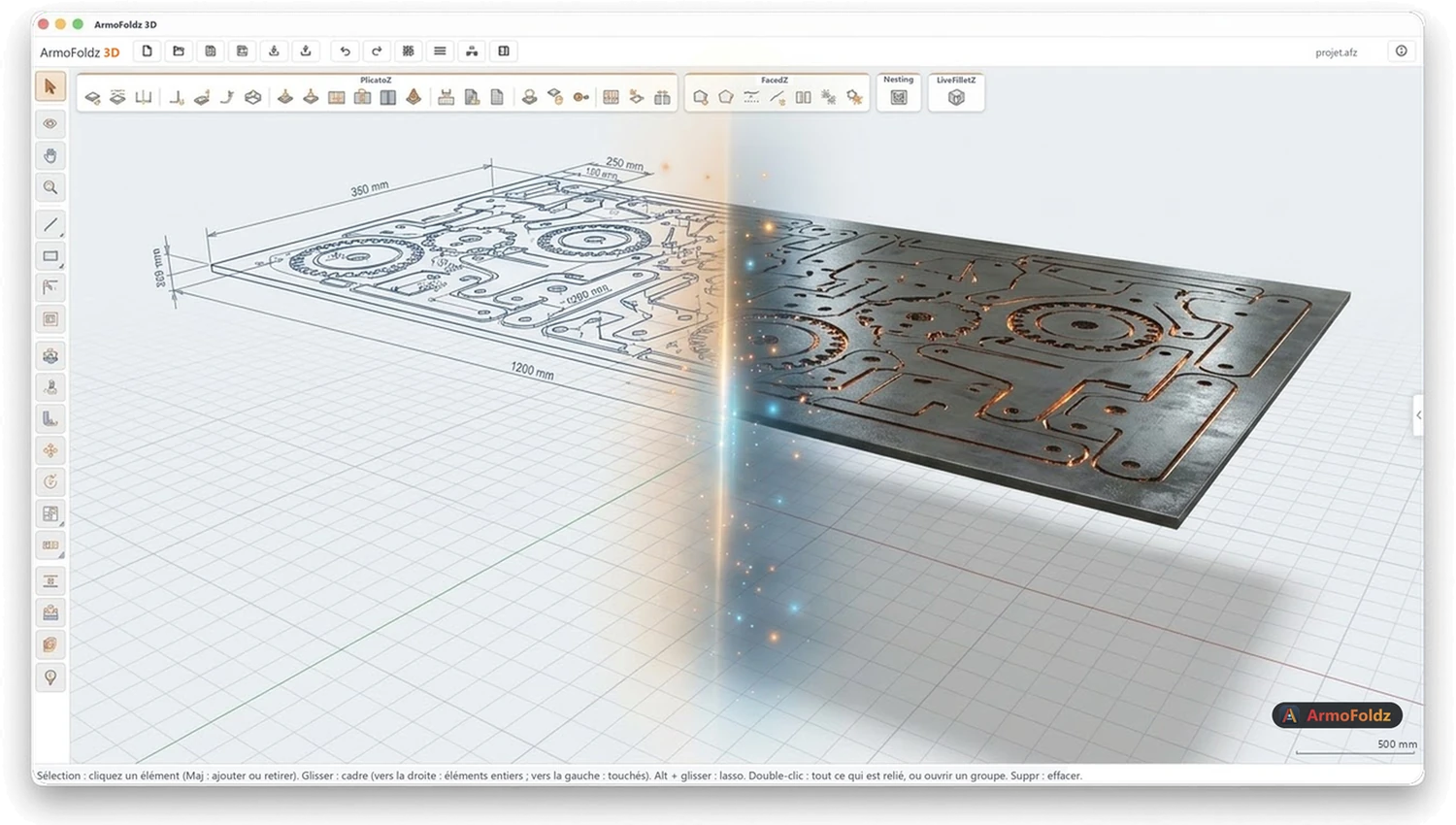
Ateliers de découpe, fabricants d'enseignes et de présentoirs : nettoyez vos contours, ajoutez des ponts en pointillés et placez vos pièces pour perdre moins de matière.
Gratuit, sans publicité. Chaque extension s'essaie gratuitement pendant 5 jours.
Dessinez vos idées en 3D, simplement et avec précision : pièces, objets, meubles, petits ouvrages. Gratuit et sans publicité. Il ne sert pas aux très grosses modélisations ni à l'architecture complexe.
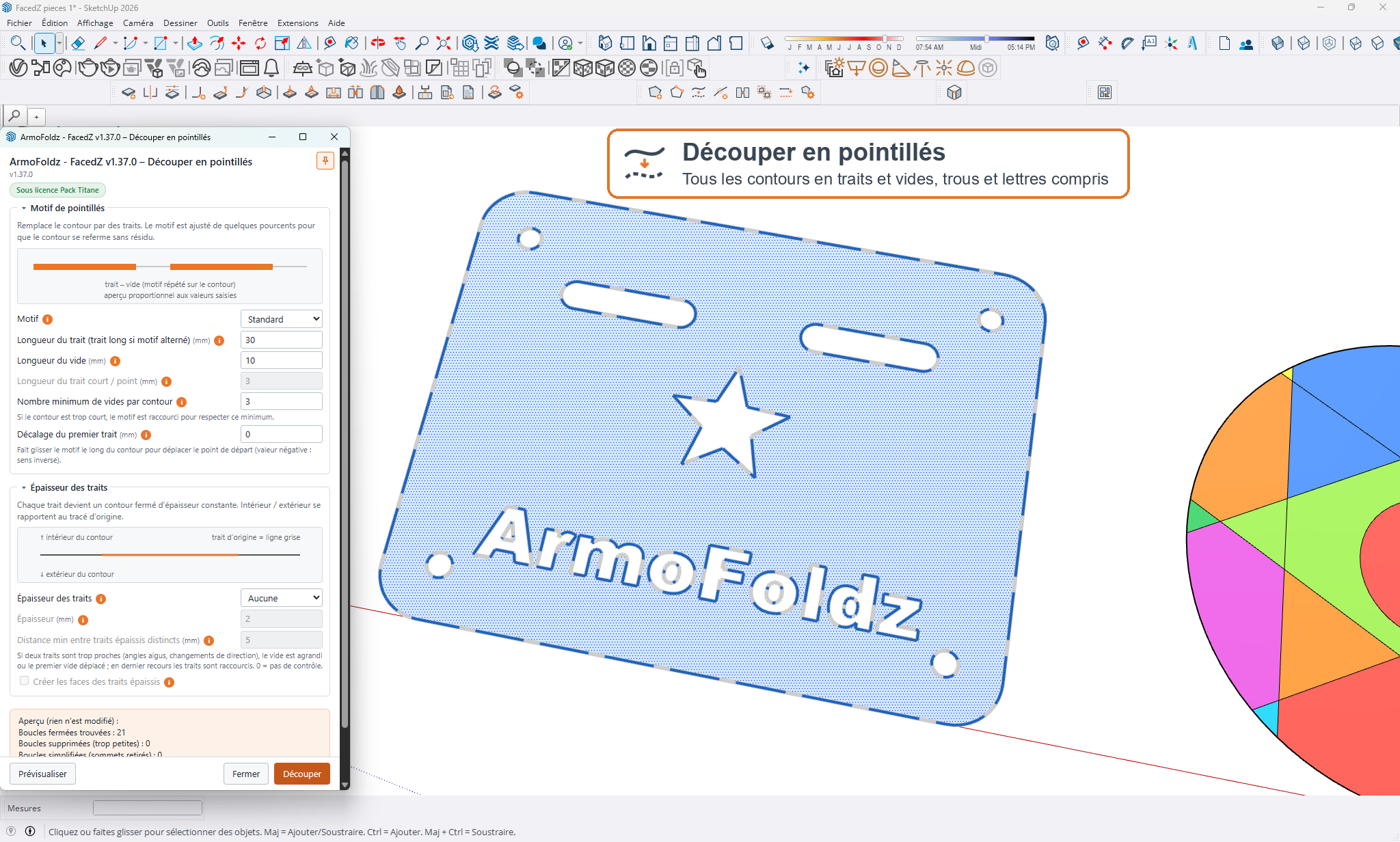
DécouvrirRefermez les tracés ouverts, créez les faces manquantes, supprimez les arêtes minuscules et transformez vos contours en pointillés, avec aperçu avant validation.
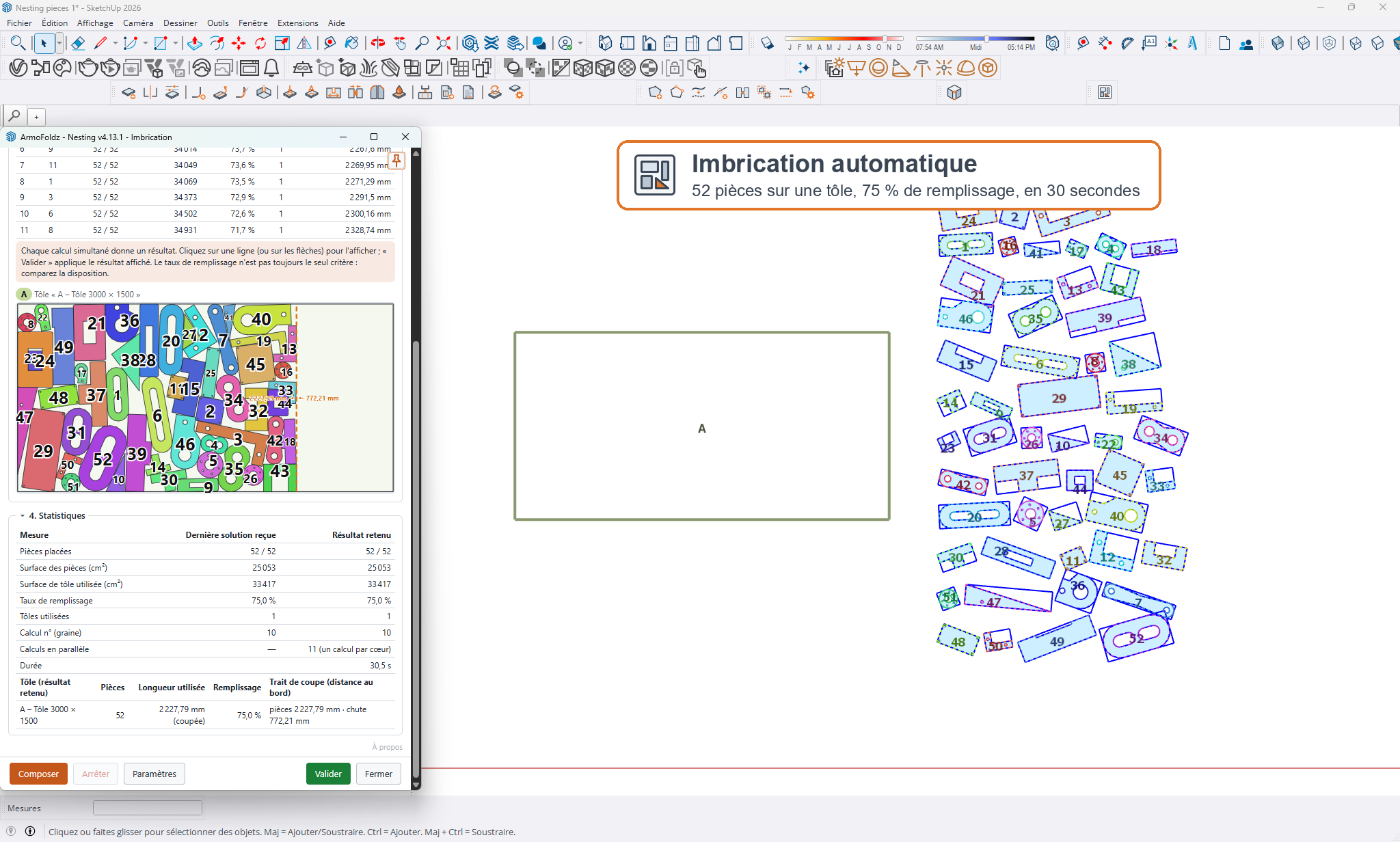
DécouvrirChoisissez vos plaques et vos pièces : l'extension cherche la disposition qui perd le moins de matière et place des copies numérotées. Vos originaux restent intacts.
DécouvrirUn fichier DXF propre fait gagner du temps à la machine comme à l'opérateur. Contours fermés, faces correctes, pointillés pour que les pièces ne tombent pas, et pièces rangées sur la plaque pour limiter les chutes : voilà ce que vous cherchez quand vous tapez « préparer un fichier pour la découpe laser » ou « logiciel d'imbrication gratuit ».
Avec FacedZ et Nesting, ces étapes se font en quelques clics, sans être un expert de la CAO. Vous dessinez dans ArmoFoldz 3D, vous nettoyez le tracé, vous placez les pièces et vous exportez.
FacedZ referme les tracés ouverts selon un écart maximal, crée les faces manquantes (trous compris), supprime les arêtes minuscules et simplifie les sommets. Un aperçu 3D vous montre le résultat avant de valider, et un seul Ctrl+Z annule toute l'opération.
Les pointillés permettent de laisser des petits liens entre la pièce et la plaque. FacedZ transforme vos contours en pointillés avec trois motifs au choix, une épaisseur constante dans les angles et la distance minimale que vous voulez entre les traits.
Nesting cherche la disposition qui perd le moins de matière : plusieurs plaques et pièces, quantité et priorité par pièce, rotations libres ou par pas d'angle, espaces, trait de coupe, trous pris en compte. Vous voyez le placement en direct et le taux d'utilisation de chaque plaque.
Le DXF, en millimètres ou en pouces. ArmoFoldz 3D exporte aussi en SVG, STL et OBJ, et importe le DXF, le SVG, le STL et le DAE.
Non. Nesting calcule sur votre ordinateur, avec vos propres processeurs : vos plans ne sont pas envoyés sur un serveur et il n'y a pas d'inscription.
Non. Chaque outil fait une chose et la fait simplement : on sélectionne, on règle une ou deux valeurs, on valide. Les extensions s'essaient 5 jours gratuitement, et ArmoFoldz 3D est gratuit.
Ce sont des extensions pour SketchUp, compatibles avec SketchUp 2026 et 2027 sur Mac et sur Windows. Vous pouvez aussi les retrouver dans ArmoFoldz 3D, le modeleur gratuit. Les téléchargements et le mode d'emploi d'installation sont sur la page Extensions.
Cutting shops, sign and display makers: clean up your outlines, add dashed bridges and place your parts to waste less material.
Free, no ads. Each extension can be tried free for 5 days.
Draw your ideas in 3D, simply and precisely: parts, objects, furniture, small projects. Free and ad-free. It is not meant for very large models or complex architecture.
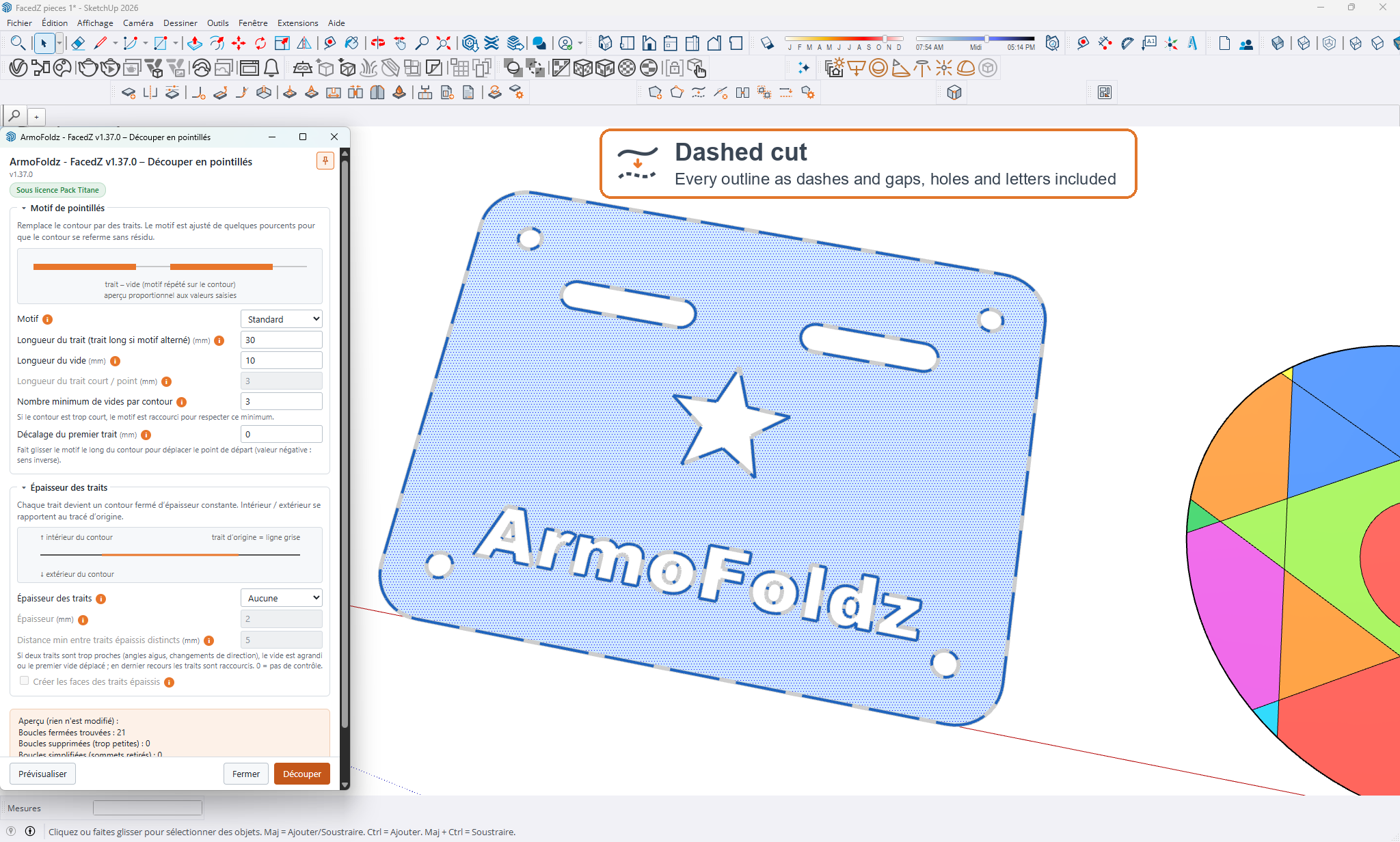
DiscoverClose open outlines, create missing faces, remove tiny edges and turn contours into dashed lines, with a preview before applying.
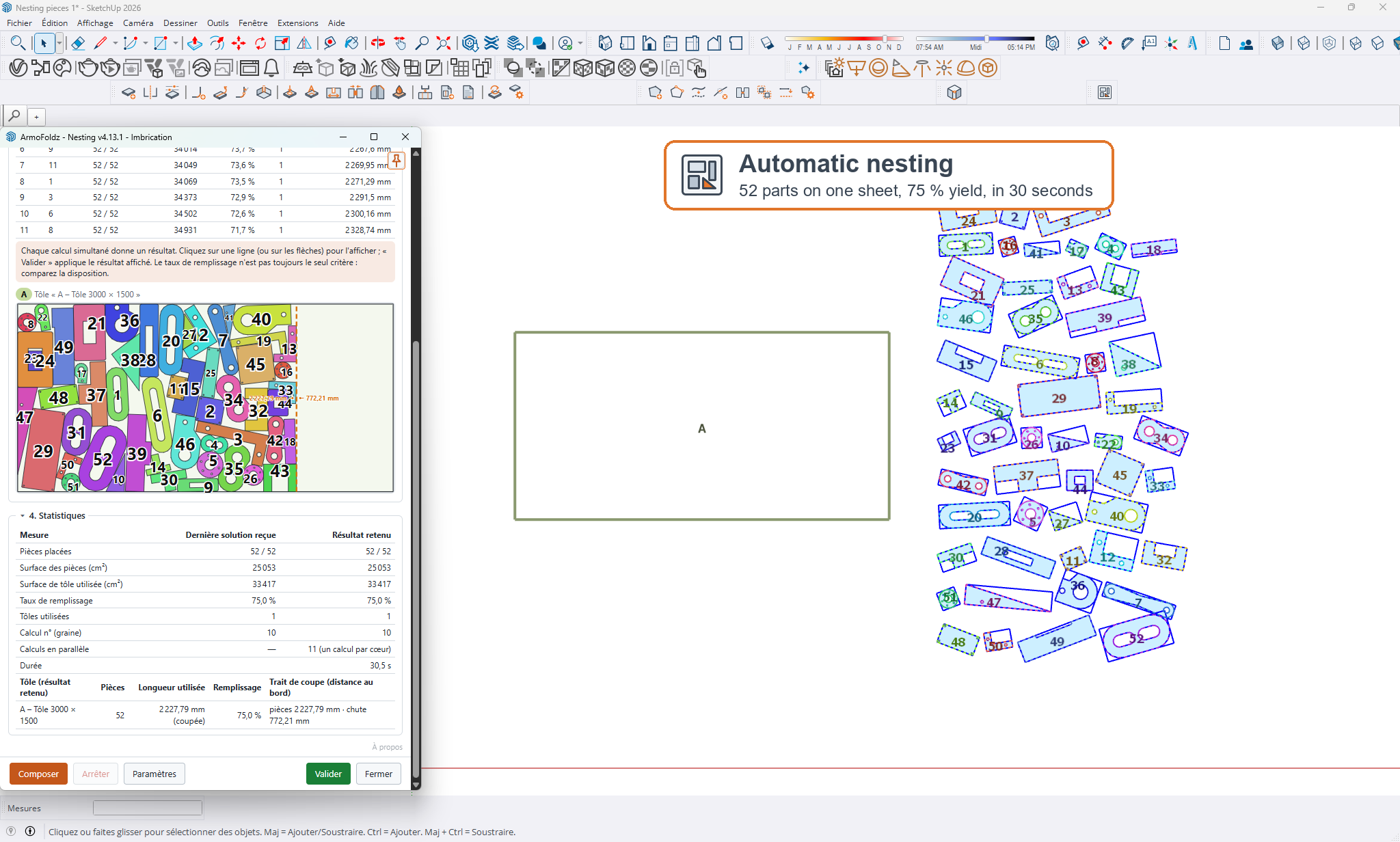
DiscoverPick your sheets and parts: the extension finds the layout that wastes the least material and places numbered copies. Your originals stay untouched.
DiscoverA clean DXF file saves time for the machine and the operator alike. Closed contours, correct faces, dashed lines so parts do not fall out, and parts arranged on the sheet to limit scrap: that is what you are after when you search for how to prepare a laser cutting file or free nesting software.
With FacedZ and Nesting, these steps take just a few clicks, no CAD expertise needed. You draw in ArmoFoldz 3D, clean up the outline, place the parts and export.
FacedZ closes open outlines within a maximum gap, creates missing faces (holes included), removes tiny edges and simplifies vertices. A 3D preview shows you the result before you confirm, and a single Ctrl+Z undoes the whole operation.
Dashed lines leave small bridges between the part and the sheet. FacedZ turns your outlines into dashed lines with three patterns to choose from, a constant thickness in corners and the minimum distance you want between segments.
Nesting looks for the layout that wastes the least material: several sheets and parts, quantity and priority per part, free rotation or angle steps, spacing, kerf, holes taken into account. You see the placement live and the utilization rate of each sheet.
DXF, in millimeters or inches. ArmoFoldz 3D also exports SVG, STL and OBJ, and imports DXF, SVG, STL and DAE.
No. Nesting calculates on your computer, using your own processors: your drawings are not sent to a server and there is no sign-up.
No. Each tool does one thing and does it simply: you select, set a value or two, and confirm. The extensions can be tried for 5 days free, and ArmoFoldz 3D is free.
They are SketchUp extensions, compatible with SketchUp 2026 and 2027 on Mac and Windows. You can also find them in ArmoFoldz 3D, the free modeller. Downloads and installation instructions are on the Extensions page.
Zuschnittbetriebe, Schilder- und Displayhersteller: Bereinigen Sie Ihre Konturen, fügen Sie Stege als Strichlinien hinzu und platzieren Sie Ihre Teile mit weniger Verschnitt.
Kostenlos, ohne Werbung. Jede Erweiterung kann 5 Tage lang kostenlos getestet werden.
Zeichnen Sie Ihre Ideen einfach und präzise in 3D: Teile, Objekte, Möbel, kleine Bauvorhaben. Kostenlos und werbefrei. Nicht gedacht für sehr große Modelle oder komplexe Architektur.
EntdeckenSchließen Sie offene Konturen, erzeugen Sie fehlende Flächen, entfernen Sie winzige Kanten und wandeln Sie Konturen in Strichlinien um, mit Vorschau vor dem Anwenden.
EntdeckenWählen Sie Ihre Platten und Teile: Die Erweiterung sucht die Anordnung mit dem geringsten Materialverlust und setzt nummerierte Kopien. Ihre Originale bleiben unverändert.
EntdeckenEine saubere DXF-Datei spart Maschine und Bediener Zeit. Geschlossene Konturen, korrekte Flächen, Haltestege als gestrichelte Linien, damit die Teile nicht herausfallen, und Teile, die so auf der Platte angeordnet sind, dass wenig Verschnitt entsteht: Genau das suchen Sie, wenn Sie „Laserschneiden Datei vorbereiten“ oder „kostenlose Verschachtelung Software“ eingeben.
Mit FacedZ und Nesting erledigen Sie diese Schritte in wenigen Klicks, auch ohne CAD-Experte zu sein. Sie zeichnen in ArmoFoldz 3D, bereinigen die Kontur, platzieren die Teile und exportieren.
FacedZ schließt offene Konturen bis zu einem maximalen Abstand, erzeugt fehlende Flächen (auch Löcher), entfernt winzige Kanten und vereinfacht die Eckpunkte. Eine 3D-Vorschau zeigt Ihnen das Ergebnis vor der Bestätigung, und ein einziges Ctrl+Z macht den gesamten Vorgang rückgängig.
Mit gestrichelten Linien lassen sich kleine Haltestege zwischen Teil und Platte stehen lassen. FacedZ wandelt Ihre Konturen in gestrichelte Linien um, mit drei Mustern zur Auswahl, gleichbleibender Breite in den Ecken und dem gewünschten Mindestabstand zwischen den Strichen.
Nesting sucht die Anordnung mit dem geringsten Materialverlust: mehrere Platten und Teile, Stückzahl und Priorität pro Teil, freie Drehung oder in Winkelschritten, Abstände, Schnittfuge, Löcher werden berücksichtigt. Sie sehen die Platzierung live und die Materialausnutzung jeder Platte.
DXF, in Millimetern oder in Zoll. ArmoFoldz 3D exportiert außerdem als SVG, STL und OBJ und importiert DXF, SVG, STL und DAE.
Nein. Nesting rechnet auf Ihrem Computer, mit Ihren eigenen Prozessoren: Ihre Pläne werden nicht an einen Server gesendet, und eine Anmeldung gibt es nicht.
Nein. Jedes Werkzeug macht eine Sache und macht sie einfach: Man wählt aus, stellt ein oder zwei Werte ein und bestätigt. Die Erweiterungen können Sie 5 Tage kostenlos testen, und ArmoFoldz 3D ist kostenlos.
Es sind Erweiterungen für SketchUp, kompatibel mit SketchUp 2026 und 2027 auf Mac und Windows. Sie finden sie auch in ArmoFoldz 3D, dem kostenlosen Modellierer. Downloads und Installationsanleitung stehen auf der Seite Erweiterungen.
Talleres de corte, fabricantes de rótulos y expositores: limpie sus contornos, añada puentes discontinuos y coloque sus piezas para desperdiciar menos material.
Gratis, sin publicidad. Cada extensión puede probarse gratis durante 5 días.
Dibuje sus ideas en 3D, de forma sencilla y precisa: piezas, objetos, muebles, pequeñas obras. Gratuito y sin publicidad. No está pensado para modelos muy grandes ni para arquitectura compleja.
DescubrirCierre contornos abiertos, cree las caras que faltan, elimine aristas diminutas y convierta sus contornos en líneas discontinuas, con vista previa antes de aplicar.
DescubrirElija sus planchas y piezas: la extensión busca la disposición que menos material desperdicia y coloca copias numeradas. Sus originales quedan intactos.
DescubrirUn archivo DXF limpio ahorra tiempo tanto a la máquina como al operario. Contornos cerrados, caras correctas, líneas de puntos para que las piezas no se caigan y piezas bien distribuidas en la plancha para reducir los desperdicios: eso es lo que busca cuando escribe «preparar archivo para corte láser» o «software de anidado de piezas gratis».
Con FacedZ y Nesting, estos pasos se hacen en pocos clics, sin ser un experto en CAD. Usted dibuja en ArmoFoldz 3D, limpia el trazado, coloca las piezas y exporta.
FacedZ cierra los trazados abiertos según una separación máxima, crea las caras que faltan (incluidos los agujeros), elimina las aristas diminutas y simplifica los vértices. Una vista previa en 3D le muestra el resultado antes de validar, y un solo Ctrl+Z deshace toda la operación.
Las líneas de puntos permiten dejar pequeños puentes entre la pieza y la plancha. FacedZ convierte sus contornos en líneas de puntos con tres motivos a elegir, un espesor constante en los ángulos y la distancia mínima que usted quiera entre los trazos.
Nesting busca la disposición que pierde menos material: varias planchas y piezas, cantidad y prioridad por pieza, rotaciones libres o por pasos de ángulo, separaciones, ancho de corte y agujeros tenidos en cuenta. Ve la colocación en directo y el porcentaje de aprovechamiento de cada plancha.
El DXF, en milímetros o en pulgadas. ArmoFoldz 3D también exporta en SVG, STL y OBJ, e importa DXF, SVG, STL y DAE.
No. Nesting calcula en su ordenador, con sus propios procesadores: sus planos no se envían a ningún servidor y no hay registro.
No. Cada herramienta hace una cosa y la hace de forma sencilla: se selecciona, se ajustan uno o dos valores y se valida. Las extensiones se prueban 5 días gratis, y ArmoFoldz 3D es gratuito.
Son extensiones para SketchUp, compatibles con SketchUp 2026 y 2027 en Mac y en Windows. También las encuentra en ArmoFoldz 3D, el modelador gratuito. Las descargas y las instrucciones de instalación están en la página Extensiones.
Officine di taglio, produttori di insegne ed espositori: pulisci i contorni, aggiungi ponti tratteggiati e posiziona i pezzi per sprecare meno materiale.
Gratuito, senza pubblicità. Ogni estensione si può provare gratuitamente per 5 giorni.
Disegna le tue idee in 3D, in modo semplice e preciso: pezzi, oggetti, mobili, piccole opere. Gratuito e senza pubblicità. Non è pensato per modelli molto grandi né per architettura complessa.
ScopriChiudi i contorni aperti, crea le facce mancanti, elimina i piccoli spigoli e trasforma i contorni in tratteggi, con anteprima prima di applicare.
ScopriScegli lastre e pezzi: l'estensione cerca la disposizione che spreca meno materiale e inserisce copie numerate. Gli originali restano intatti.
ScopriUn file DXF pulito fa risparmiare tempo sia alla macchina sia all'operatore. Contorni chiusi, facce corrette, tratteggi perché i pezzi non cadano, e pezzi disposti sulla lastra per ridurre gli scarti: è quello che cerchi quando scrivi «preparare un file per taglio laser» o «software nesting gratuito».
Con FacedZ e Nesting questi passaggi si fanno in pochi clic, senza essere un esperto di CAD. Disegni in ArmoFoldz 3D, pulisci il tracciato, disponi i pezzi ed esporti.
FacedZ chiude i tracciati aperti entro una distanza massima, crea le facce mancanti (fori compresi), elimina gli spigoli minuscoli e semplifica i vertici. Un'anteprima 3D ti mostra il risultato prima di confermare, e un solo Ctrl+Z annulla l'intera operazione.
I tratteggi permettono di lasciare dei piccoli ponticelli tra il pezzo e la lastra. FacedZ trasforma i tuoi contorni in tratteggi con tre motivi a scelta, uno spessore costante negli angoli e la distanza minima che desideri tra i tratti.
Nesting cerca la disposizione che spreca meno materiale: più lastre e più pezzi, quantità e priorità per pezzo, rotazioni libere o a passo d'angolo, spazi, larghezza di taglio, fori presi in considerazione. Vedi la disposizione in tempo reale e la percentuale di utilizzo di ogni lastra.
Il DXF, in millimetri o in pollici. ArmoFoldz 3D esporta anche in SVG, STL e OBJ, e importa DXF, SVG, STL e DAE.
No. Nesting calcola sul tuo computer, con i tuoi processori: i tuoi disegni non vengono inviati a un server e non c'è nessuna registrazione.
No. Ogni strumento fa una cosa e la fa in modo semplice: si seleziona, si regolano uno o due valori, si conferma. Le estensioni si provano gratuitamente per 5 giorni, e ArmoFoldz 3D è gratuito.
Sono estensioni per SketchUp, compatibili con SketchUp 2026 e 2027 su Mac e Windows. Le trovi anche in ArmoFoldz 3D, il modellatore gratuito. I download e le istruzioni di installazione sono nella pagina Estensioni.