ArmoFoldz 3D
Dessinez vos idées en 3D, simplement et avec précision : pièces, objets, meubles, petits ouvrages. Gratuit et sans publicité. Il ne sert pas aux très grosses modélisations ni à l'architecture complexe.
Découvrir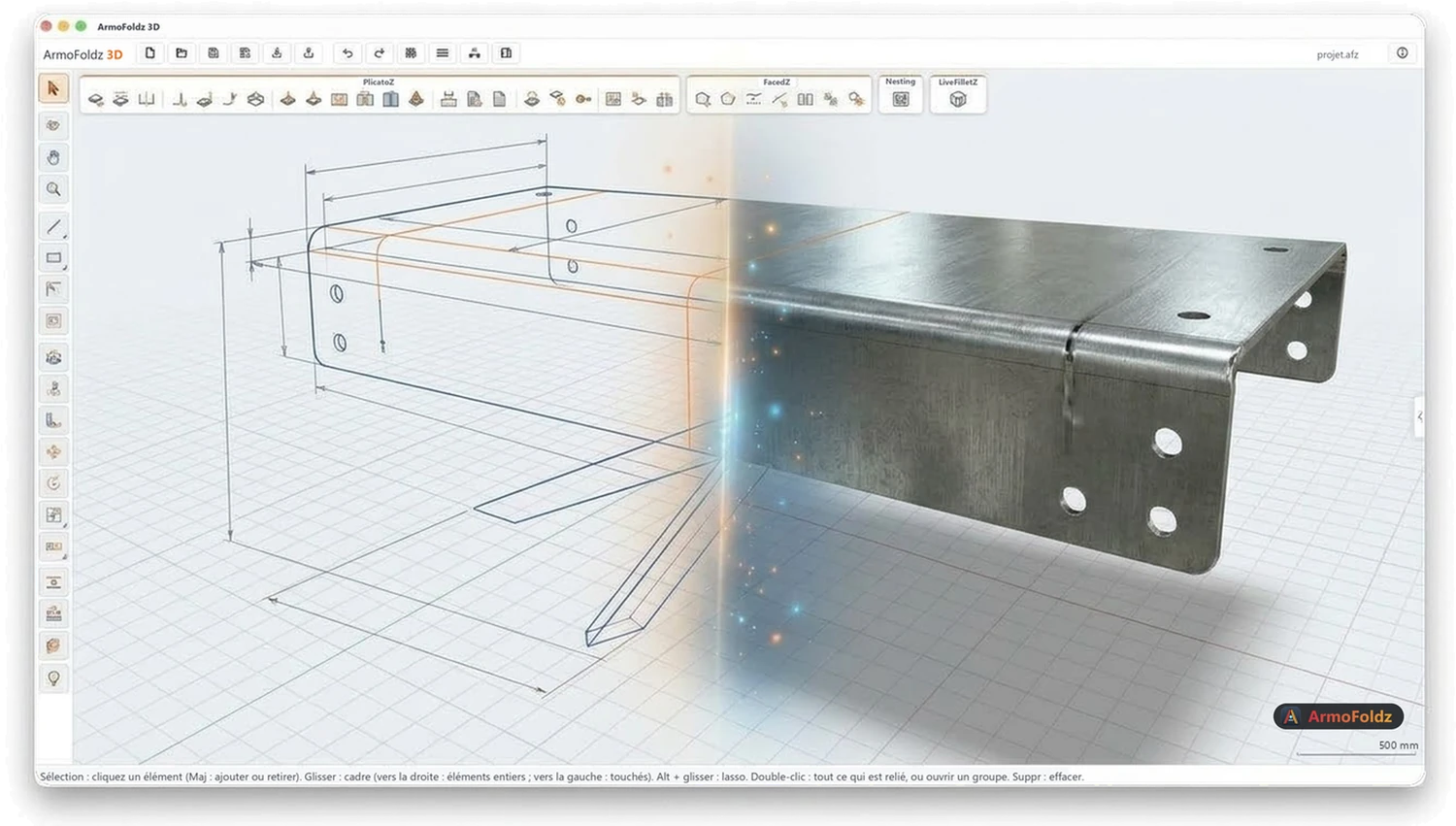
Métalliers, serruriers, chaudronniers, tôliers, carrossiers : dessinez votre pièce, dépliez-la, placez-la sur la tôle, et envoyez le DXF à la découpe.
Gratuit, sans publicité. Chaque extension s'essaie gratuitement pendant 5 jours.
Dessinez vos idées en 3D, simplement et avec précision : pièces, objets, meubles, petits ouvrages. Gratuit et sans publicité. Il ne sert pas aux très grosses modélisations ni à l'architecture complexe.
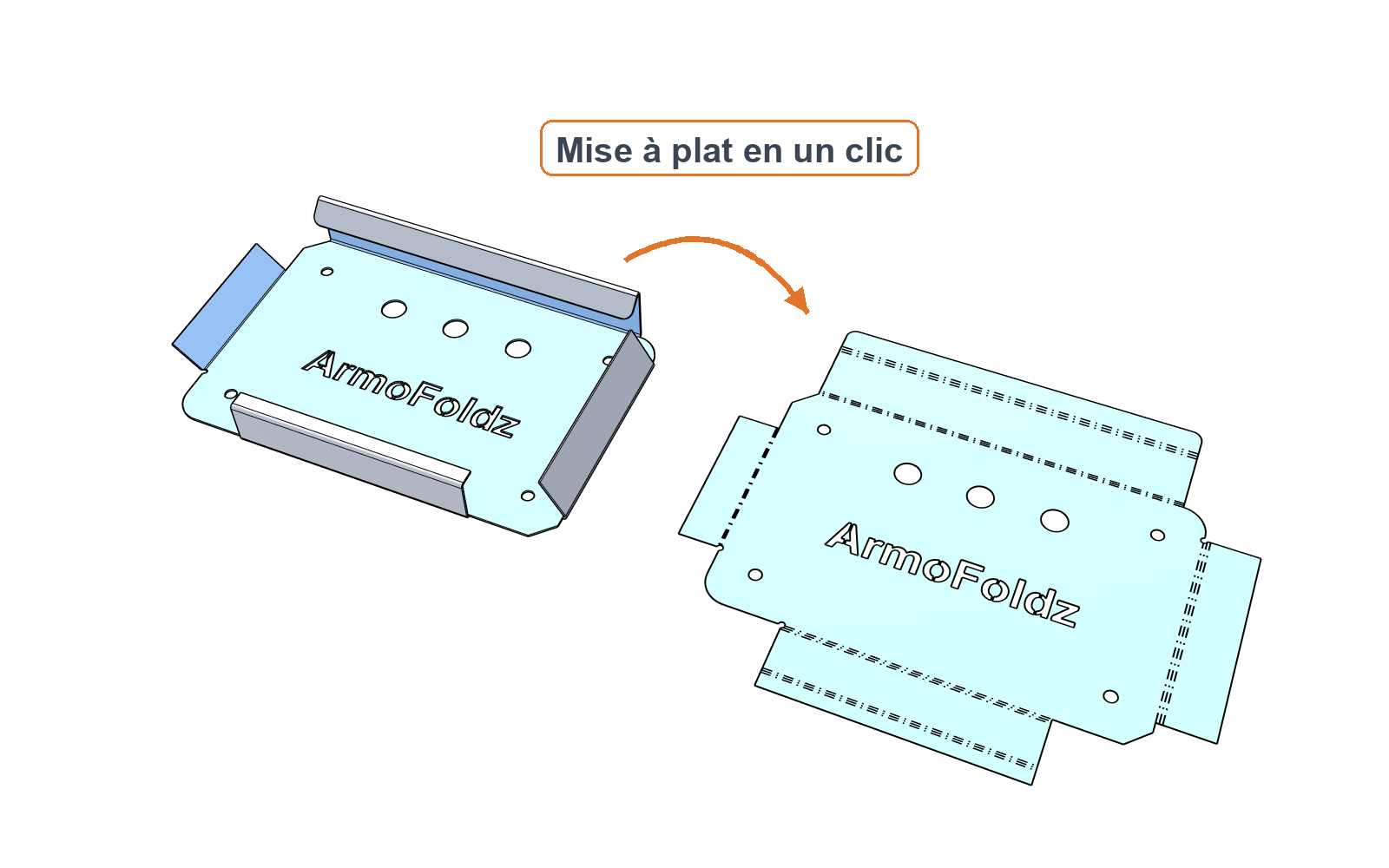
DécouvrirAjoutez vos plis (angle, sens, rayon, longueur) : la pièce se construit en 3D avec son épaisseur réelle. Développé à plat et DXF en millimètres, rapport de calcul pour chaque pli, détection des collisions.
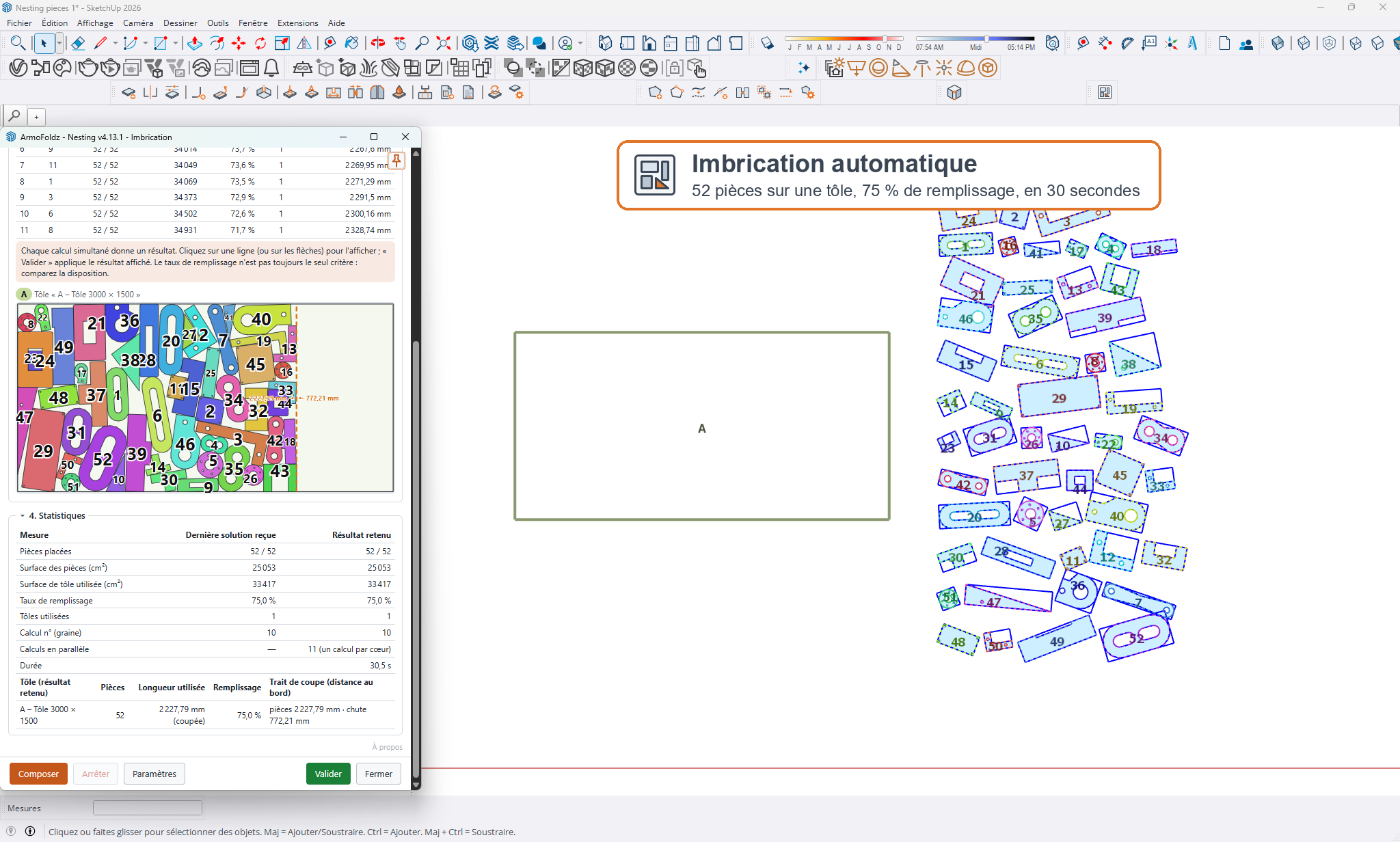
DécouvrirChoisissez vos tôles et vos pièces : l'extension cherche la disposition qui perd le moins de matière et place des copies numérotées. Vos originaux restent intacts.
DécouvrirLe facteur K est indicatif : validez toujours le développé par un essai de pliage avant fabrication.
Vous cherchez un logiciel gratuit pour déplier une tôle, calculer un développé de pliage ou préparer un fichier DXF pour votre machine ? Avec ArmoFoldz 3D vous dessinez la pièce en 3D, avec PlicatoZ vous ajoutez vos plis, et le développé à plat se calcule tout seul, avec les trous et les découpes. Plus besoin de refaire chaque pli à la main.
Métalliers, serruriers, chaudronniers, tôliers : la prise en main est rapide. On dessine, on plie, on déplie, on exporte. Quelques clics suffisent pour passer d'un croquis à une tôle prête à découper.
Avec PlicatoZ, vous dessinez la tôle avec son épaisseur, vous ajoutez vos plis (angle, sens, rayon, longueur) et le développé à plat est calculé pour vous, avec un rapport de calcul pli par pli. Vous exportez ensuite le DXF en millimètres, avec des calques séparés pour la découpe, le pliage et le marquage.
Non. PlicatoZ propose le facteur K comme un simple réglage : vous le laissez par défaut ou vous l'ajustez selon votre matière. Il reste indicatif : validez toujours le développé par un essai de pliage avant de fabriquer. PlicatoZ gère les plis droits.
Le DXF en millimètres, avec ses calques de découpe, de pliage et de marquage. ArmoFoldz 3D exporte aussi en DXF, SVG, STL et OBJ, ce qui couvre la plupart des machines et des logiciels de fabrication.
Oui. PlicatoZ gère les trous et les découpes, les chanfreins, les arrondis, les perçages et les encoches. Pour arrondir des arêtes tout en gardant la pièce modifiable, LiveFilletZ le fait en direct.
Nesting place automatiquement vos pièces à plat sur vos tôles : rotations, espaces, marge de bord, trait de coupe, trous pris en compte. Il vous donne le taux d'utilisation de chaque tôle. Le calcul se fait sur votre ordinateur, sans inscription.
Non : le logiciel est pensé pour se prendre en main sans formation longue. ArmoFoldz 3D est gratuit, et chaque extension s'essaie gratuitement pendant 5 jours avec toutes ses fonctions.
Ce sont des extensions pour SketchUp, compatibles avec SketchUp 2026 et 2027 sur Mac et sur Windows. Vous pouvez aussi les retrouver dans ArmoFoldz 3D, le modeleur gratuit. Les téléchargements et le mode d'emploi d'installation sont sur la page Extensions.
Metalworkers, locksmiths, boilermakers, sheet-metal workers, coachbuilders: draw your part, unfold it, place it on the sheet and send the DXF to cutting.
Free, no ads. Each extension can be tried free for 5 days.
Draw your ideas in 3D, simply and precisely: parts, objects, furniture, small projects. Free and ad-free. It is not meant for very large models or complex architecture.
DiscoverAdd your bends (angle, direction, radius, length): the part is built in 3D with its real thickness. Flat pattern and DXF in millimetres, a calculation report for each bend, collision detection.
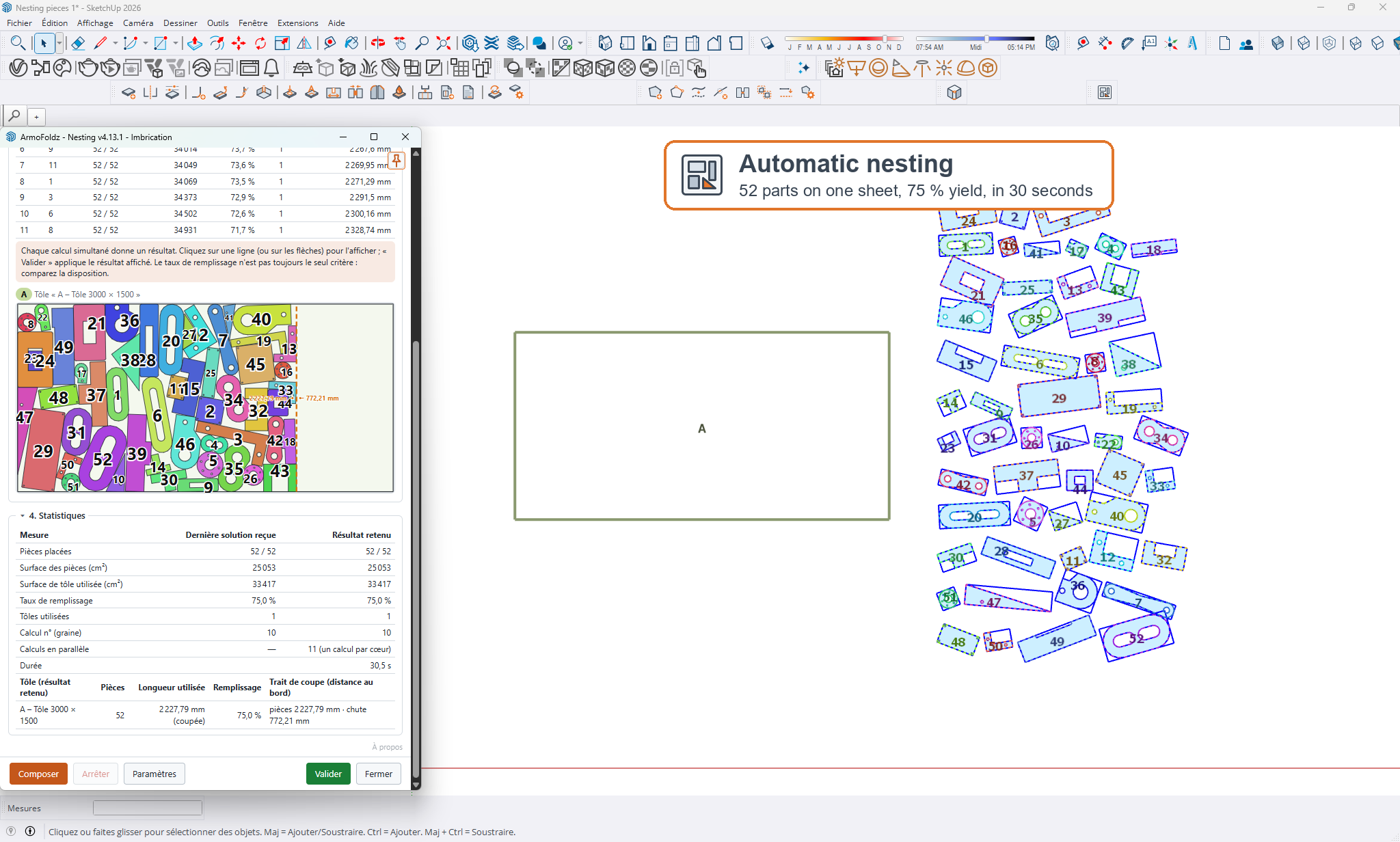
DiscoverPick your sheets and parts: the extension finds the layout that wastes the least material and places numbered copies. Your originals stay untouched.
DiscoverThe K-factor is indicative: always validate the flat pattern with a test bend before production.
Looking for free sheet metal unfolding software, a bend flat pattern calculator, or a way to prepare a DXF file for your machine? With ArmoFoldz 3D you draw the part in 3D, with PlicatoZ you add your bends, and the flat pattern is calculated for you, holes and cutouts included. No more working out every bend by hand.
Metalworkers, locksmiths, boilermakers, sheet metal fabricators: it is quick to pick up. You draw, bend, unfold and export. A few clicks are enough to go from a sketch to a sheet ready to cut.
With PlicatoZ, you draw the part with its thickness, add your bends (angle, direction, radius, length) and the flat pattern is calculated for you, with a bend-by-bend calculation report. You then export the DXF in millimeters, with separate layers for cutting, bending and marking.
No. PlicatoZ offers the K-factor as a simple setting: leave it at the default or adjust it for your material. It remains an estimate: always check the flat pattern with a test bend before manufacturing. PlicatoZ handles straight bends.
The DXF in millimeters, with its cutting, bending and marking layers. ArmoFoldz 3D also exports DXF, SVG, STL and OBJ, which covers most machines and manufacturing software.
Yes. PlicatoZ handles holes and cutouts, chamfers, rounded edges, drilled holes and notches. To round edges while keeping the part editable, LiveFilletZ does it live.
Nesting automatically lays out your flat parts on your sheets, taking rotations, spacing, edge margin, kerf and holes into account. It gives you the utilization rate of each sheet. The calculation runs on your computer, with no sign-up.
No: the software is designed to be easy to pick up without long training. ArmoFoldz 3D is free, and each extension can be tried free for 5 days with all its features.
They are SketchUp extensions, compatible with SketchUp 2026 and 2027 on Mac and Windows. You can also find them in ArmoFoldz 3D, the free modeller. Downloads and installation instructions are on the Extensions page.
Metallbauer, Schlosser, Kesselbauer, Blechbearbeiter, Karosseriebauer: Zeichnen Sie Ihr Teil, wickeln Sie es ab, platzieren Sie es auf dem Blech und schicken Sie die DXF-Datei zum Zuschnitt.
Kostenlos, ohne Werbung. Jede Erweiterung kann 5 Tage lang kostenlos getestet werden.
Zeichnen Sie Ihre Ideen einfach und präzise in 3D: Teile, Objekte, Möbel, kleine Bauvorhaben. Kostenlos und werbefrei. Nicht gedacht für sehr große Modelle oder komplexe Architektur.
EntdeckenFügen Sie Ihre Biegungen hinzu (Winkel, Richtung, Radius, Länge): Das Teil entsteht in 3D mit seiner echten Blechdicke. Abwicklung und DXF in Millimetern, Berechnungsbericht pro Biegung, Kollisionserkennung.
EntdeckenWählen Sie Ihre Bleche und Teile: Die Erweiterung sucht die Anordnung mit dem geringsten Materialverlust und setzt nummerierte Kopien. Ihre Originale bleiben unverändert.
EntdeckenDer K-Faktor ist ein Richtwert: Prüfen Sie die Abwicklung vor der Fertigung immer mit einem Probebiegen.
Sie suchen eine kostenlose Software, um ein Blech abzuwickeln, eine Blechabwicklung zu berechnen oder eine DXF-Datei für Ihre Maschine vorzubereiten? Mit ArmoFoldz 3D zeichnen Sie das Teil in 3D, mit PlicatoZ fügen Sie Ihre Biegungen hinzu, und die flache Abwicklung wird automatisch berechnet, samt Löchern und Ausschnitten. Sie müssen nicht mehr jede Biegung von Hand nachrechnen.
Metallbauer, Schlosser, Kesselbauer, Blechbearbeiter: Der Einstieg gelingt schnell. Man zeichnet, kantet, wickelt ab, exportiert. Wenige Klicks genügen, um aus einer Skizze ein schneidfertiges Blech zu machen.
Mit PlicatoZ zeichnen Sie das Blech mit seiner Dicke, fügen Ihre Biegungen hinzu (Winkel, Richtung, Radius, Länge), und die flache Abwicklung wird für Sie berechnet, mit einem Berechnungsbericht Biegung für Biegung. Anschließend exportieren Sie die DXF-Datei in Millimetern, mit getrennten Layern für Schnitt, Biegung und Markierung.
Nein. PlicatoZ bietet den K-Faktor als einfache Einstellung an: Sie lassen den Standardwert stehen oder passen ihn an Ihr Material an. Er bleibt ein Richtwert: Prüfen Sie die Abwicklung vor der Fertigung immer mit einer Probebiegung. PlicatoZ verarbeitet gerade Biegungen.
Die DXF-Datei in Millimetern, mit ihren Layern für Schnitt, Biegung und Markierung. ArmoFoldz 3D exportiert außerdem als DXF, SVG, STL und OBJ, was die meisten Maschinen und Fertigungsprogramme abdeckt.
Ja. PlicatoZ verarbeitet Löcher und Ausschnitte, Fasen, Rundungen, Bohrungen und Aussparungen. Um Kanten zu runden und das Teil dabei weiter änderbar zu halten, erledigt LiveFilletZ das live.
Nesting platziert Ihre Teile automatisch flach auf Ihren Blechen: Drehungen, Abstände, Randabstand, Schnittfuge und Löcher werden berücksichtigt. Sie erhalten die Materialausnutzung jedes Blechs. Die Berechnung läuft auf Ihrem Computer, ohne Anmeldung.
Nein: Die Software ist so gedacht, dass man ohne lange Schulung damit zurechtkommt. ArmoFoldz 3D ist kostenlos, und jede Erweiterung können Sie 5 Tage lang kostenlos mit allen Funktionen ausprobieren.
Es sind Erweiterungen für SketchUp, kompatibel mit SketchUp 2026 und 2027 auf Mac und Windows. Sie finden sie auch in ArmoFoldz 3D, dem kostenlosen Modellierer. Downloads und Installationsanleitung stehen auf der Seite Erweiterungen.
Metalistas, cerrajeros, calderería, chapistas, carroceros: dibuje su pieza, desarróllela, colóquela en la chapa y envíe el DXF al corte.
Gratis, sin publicidad. Cada extensión puede probarse gratis durante 5 días.
Dibuje sus ideas en 3D, de forma sencilla y precisa: piezas, objetos, muebles, pequeñas obras. Gratuito y sin publicidad. No está pensado para modelos muy grandes ni para arquitectura compleja.
DescubrirAñada sus pliegues (ángulo, sentido, radio, longitud): la pieza se construye en 3D con su espesor real. Desarrollo plano y DXF en milímetros, informe de cálculo por pliegue, detección de colisiones.
DescubrirElija sus chapas y piezas: la extensión busca la disposición que menos material desperdicia y coloca copias numeradas. Sus originales quedan intactos.
DescubrirEl factor K es orientativo: valide siempre el desarrollo con una prueba de plegado antes de fabricar.
¿Busca un software gratuito para desarrollar una chapa, calcular el desarrollo de un plegado o preparar un archivo DXF para su máquina? Con ArmoFoldz 3D dibuja la pieza en 3D, con PlicatoZ añade sus pliegues y el desarrollo plano se calcula solo, con los agujeros y los recortes. Ya no tiene que rehacer cada pliegue a mano.
Herreros, cerrajeros, caldereros, chapistas: se aprende a usar enseguida. Se dibuja, se pliega, se desarrolla y se exporta. Bastan unos clics para pasar de un boceto a una chapa lista para cortar.
Con PlicatoZ, usted dibuja la chapa con su espesor, añade sus pliegues (ángulo, sentido, radio, longitud) y el desarrollo plano se calcula por usted, con un informe de cálculo pliegue por pliegue. Después exporta el DXF en milímetros, con capas separadas para el corte, el plegado y el marcado.
No. PlicatoZ ofrece el factor K como un simple ajuste: puede dejarlo por defecto o modificarlo según su material. Es orientativo: valide siempre el desarrollo con una prueba de plegado antes de fabricar. PlicatoZ trabaja con pliegues rectos.
El DXF en milímetros, con sus capas de corte, plegado y marcado. ArmoFoldz 3D también exporta en DXF, SVG, STL y OBJ, lo que cubre la mayoría de las máquinas y de los programas de fabricación.
Sí. PlicatoZ gestiona los agujeros y los recortes, los chaflanes, los redondeos, los taladros y las muescas. Para redondear aristas manteniendo la pieza editable, LiveFilletZ lo hace en directo.
Nesting coloca automáticamente sus piezas planas sobre sus chapas: rotaciones, separaciones, margen de borde, ancho de corte y agujeros tenidos en cuenta. Le indica el porcentaje de aprovechamiento de cada chapa. El cálculo se hace en su ordenador, sin registro.
No: el software está pensado para aprender a usarlo sin una formación larga. ArmoFoldz 3D es gratuito, y cada extensión se puede probar gratis durante 5 días con todas sus funciones.
Son extensiones para SketchUp, compatibles con SketchUp 2026 y 2027 en Mac y en Windows. También las encuentra en ArmoFoldz 3D, el modelador gratuito. Las descargas y las instrucciones de instalación están en la página Extensiones.
Fabbri, serramentisti, carpentieri in ferro, lattonieri, carrozzieri: disegna il tuo pezzo, sviluppalo, posizionalo sulla lamiera e invia il DXF al taglio.
Gratuito, senza pubblicità. Ogni estensione si può provare gratuitamente per 5 giorni.
Disegna le tue idee in 3D, in modo semplice e preciso: pezzi, oggetti, mobili, piccole opere. Gratuito e senza pubblicità. Non è pensato per modelli molto grandi né per architettura complessa.
ScopriAggiungi le pieghe (angolo, direzione, raggio, lunghezza): il pezzo viene costruito in 3D con il suo spessore reale. Sviluppo piano e DXF in millimetri, rapporto di calcolo per ogni piega, rilevamento delle collisioni.
ScopriScegli lamiere e pezzi: l'estensione cerca la disposizione che spreca meno materiale e inserisce copie numerate. Gli originali restano intatti.
ScopriIl fattore K è indicativo: convalida sempre lo sviluppo con una piega di prova prima della produzione.
Cerchi un software gratuito per sviluppare una lamiera, calcolare lo sviluppo di una piegatura o preparare un file DXF per la tua macchina? Con ArmoFoldz 3D disegni il pezzo in 3D, con PlicatoZ aggiungi le tue pieghe e lo sviluppo piano si calcola da solo, con fori e tagli inclusi. Non serve più rifare ogni piega a mano.
Carpentieri, fabbri, calderai, lattonieri: si impara a usarlo in fretta. Si disegna, si piega, si sviluppa, si esporta. Bastano pochi clic per passare da uno schizzo a una lamiera pronta per il taglio.
Con PlicatoZ disegni la lamiera con il suo spessore, aggiungi le pieghe (angolo, direzione, raggio, lunghezza) e lo sviluppo piano viene calcolato per te, con un rapporto di calcolo piega per piega. Poi esporti il DXF in millimetri, con livelli separati per taglio, piegatura e marcatura.
No. PlicatoZ propone il fattore K come una semplice impostazione: puoi lasciare quello predefinito oppure regolarlo in base al tuo materiale. Resta indicativo: convalida sempre lo sviluppo con una prova di piegatura prima di produrre. PlicatoZ gestisce le pieghe rette.
Il DXF in millimetri, con i suoi livelli di taglio, piegatura e marcatura. ArmoFoldz 3D esporta anche in DXF, SVG, STL e OBJ, il che copre la maggior parte delle macchine e dei software di produzione.
Sì. PlicatoZ gestisce fori e tagli, smussi, raccordi, forature e intagli. Per arrotondare gli spigoli mantenendo il pezzo modificabile, LiveFilletZ lo fa in tempo reale.
Nesting dispone automaticamente i tuoi pezzi piani sulle lamiere: rotazioni, spazi, margine di bordo, larghezza di taglio e fori vengono presi in considerazione. Ti indica la percentuale di utilizzo di ogni lamiera. Il calcolo avviene sul tuo computer, senza registrazione.
No: il software è pensato per essere imparato senza lunghi corsi. ArmoFoldz 3D è gratuito, e ogni estensione si prova gratuitamente per 5 giorni con tutte le sue funzioni.
Sono estensioni per SketchUp, compatibili con SketchUp 2026 e 2027 su Mac e Windows. Le trovi anche in ArmoFoldz 3D, il modellatore gratuito. I download e le istruzioni di installazione sono nella pagina Estensioni.